When you think about your business card, have you ever wondered if its size really matters? The right business card print size can make a big difference in how you’re remembered.
Thank you for reading this post, don't forget to subscribe!If your card is too big, it might get lost in a pile. Too small, and important details could be missed. You want a card that fits perfectly in wallets and leaves a lasting impression. You’ll discover exactly what the ideal business card print size is and why it’s so important for your success.
Keep reading to make sure your next business card works as hard as you do.
Credit: www.vistaprint.com
Standard Business Card Sizes
Business cards are small but powerful tools for sharing contact details. The size matters a lot. It affects how the card fits in wallets, cardholders, or desks. Knowing the standard business card sizes helps you create a card that looks professional and fits well.
Common Dimensions Worldwide
The most common business card size is 3.5 inches by 2 inches. This size works well in many countries. It fits easily in wallets and card slots. Many printers use this as the default size. It is simple and practical for most uses.
Variations By Region
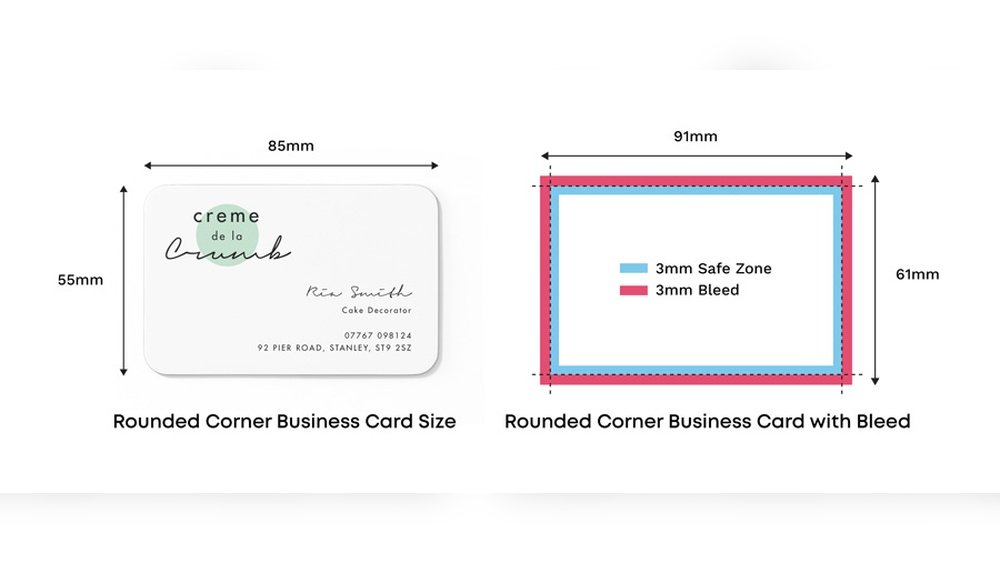
Different regions use different sizes. In Europe, 85 mm by 55 mm is popular. Japan prefers a smaller size, about 91 mm by 55 mm. Australia and New Zealand often use 90 mm by 55 mm. These sizes reflect local preferences and wallet designs.
Metric Vs Imperial Units
Some countries use metric units like millimeters. Others use imperial units like inches. The US and Canada mostly use inches. Europe, Asia, and Australia use millimeters. Knowing both helps when designing or ordering business cards globally.
Custom Business Card Sizes
Custom business card sizes allow unique designs that stand out. These cards break the mold of standard dimensions. They help create a memorable first impression. Choosing the right size adds personality and style to your brand.
Creative Shapes And Sizes
Business cards come in many shapes beyond the usual rectangle. Squares, circles, or even die-cut forms catch the eye. These creative shapes make your card more interesting. They invite people to hold and explore the design. Unique sizes give space for bold graphics and text.
Benefits Of Custom Dimensions
Custom sizes make your card different from others. They help express your brand’s identity clearly. A smaller card fits easily in wallets or pockets. Larger cards provide room for more information or images. Custom dimensions can attract attention and stay memorable longer.
Printing Considerations
Not all printers handle custom sizes easily. Check if your printer supports the dimensions you want. Some shapes need special cutting tools or extra costs. Make sure the design fits well within the printable area. Keep bleed and margin rules in mind to avoid cutting errors.
Design And Layout Dimensions
Design and layout dimensions are key to a perfect business card print size. They help your card look neat and professional. Understanding these dimensions stops your important details from being cut off. It also makes sure your design fills the space correctly. Let’s explore the main parts of these dimensions.
Safe Zone And Bleed Area
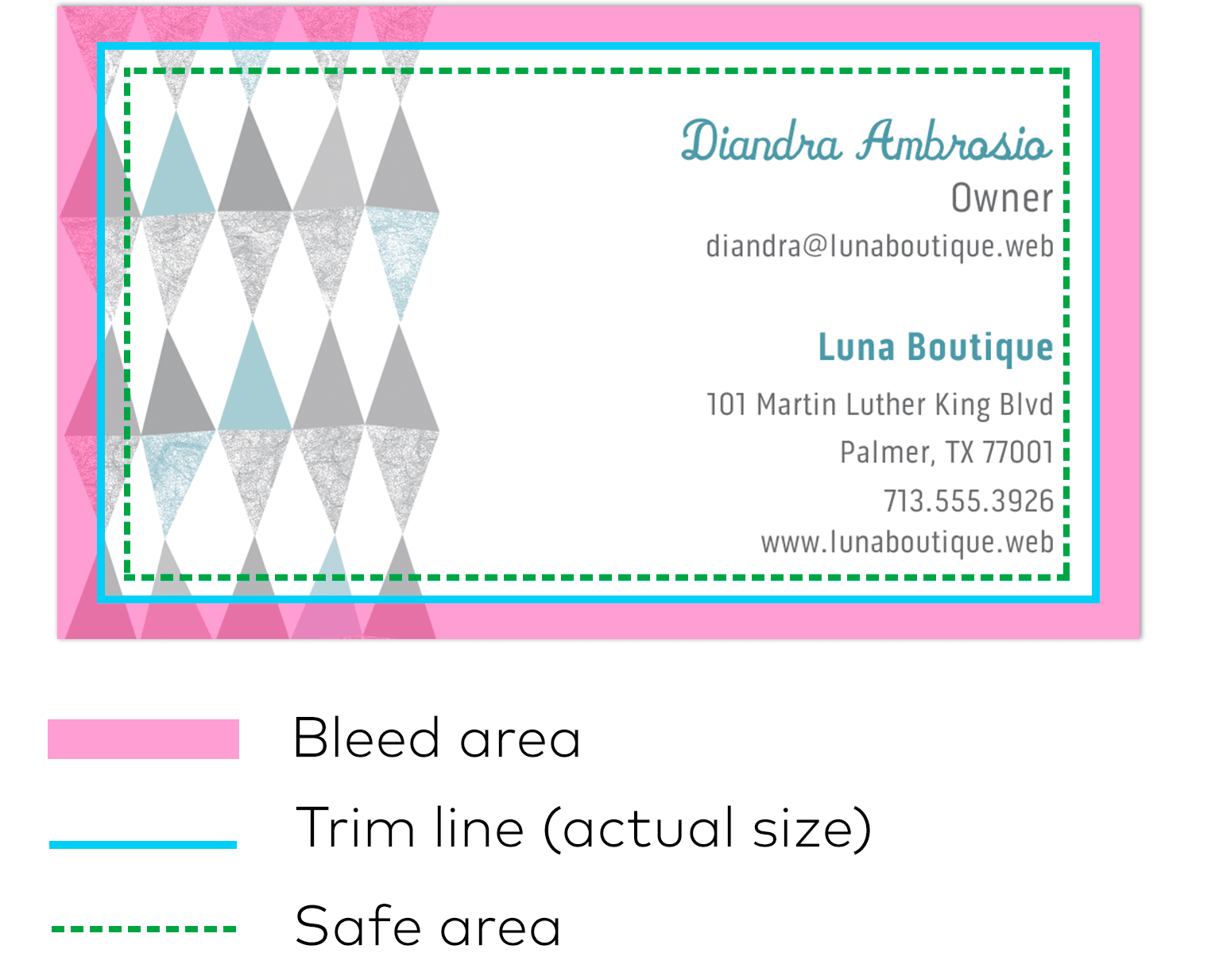
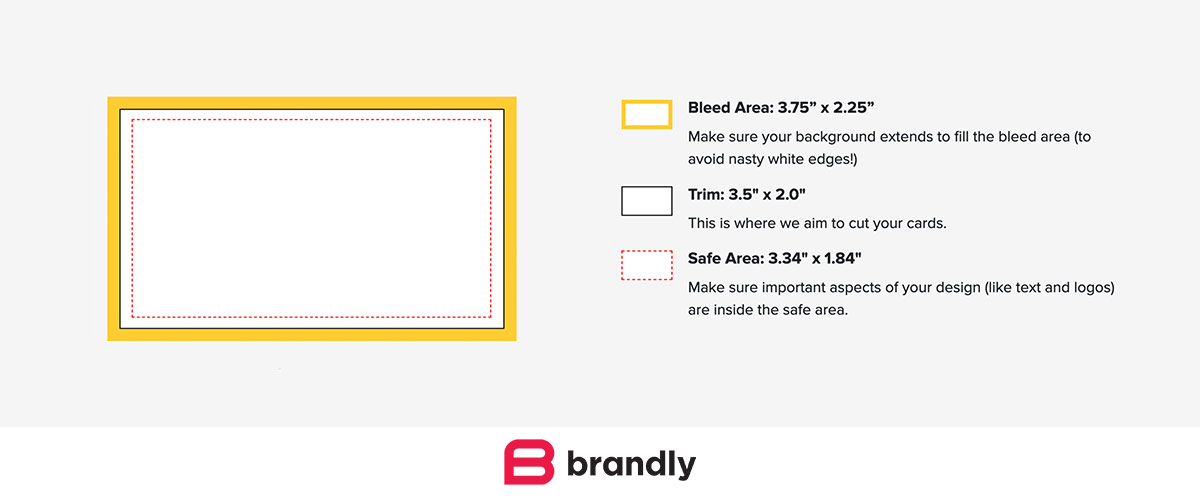
The safe zone is the space inside the card where text and logos should stay. It keeps important info away from the edges. The bleed area extends beyond the card’s edge. It allows colors or images to reach the edge after cutting. This stops white borders from showing on the card. Designing with these zones prevents mistakes during printing.
Margin Guidelines
Margins create a buffer between your design and the card edges. They keep the card clean and readable. Usually, a margin of 3 to 5 millimeters is enough. Margins protect your content from being trimmed. They also make the card look balanced and tidy. Follow margin rules to avoid crowded or cut-off designs.
Aspect Ratio Importance
The aspect ratio is the relationship between the card’s width and height. It affects how your design fits the card shape. Most business cards use a 1.75:1 ratio, like 3.5 by 2 inches. Keeping this ratio ensures your design looks natural and not stretched. It helps your card fit standard holders and wallets. Respecting aspect ratio keeps your card professional.
Credit: www.brandly.com
Material And Thickness Impact
The material and thickness of a business card affect its size and feel. Choosing the right cardstock and finish shapes how people see your card. It changes the weight, durability, and even the look. These factors matter as much as the design itself.
Standard Cardstock Sizes
Most business cards use cardstock between 14pt and 16pt thick. The common size is 3.5 x 2 inches. This size fits wallets and cardholders easily. Thicker cardstock can make the card feel stronger. Thin cardstock feels lighter but less durable.
Effect Of Thickness On Size Perception
Thicker cards look bigger even if the size stays the same. They feel more solid and important in hand. Thin cards can feel cheap or easy to lose. Thickness adds a sense of quality and professionalism. People often judge a business by the card’s weight.
Special Finishes And Their Influence
Matte, glossy, and textured finishes change the card’s surface. These finishes add thickness or smoothness without changing size. Glossy finishes make colors pop and feel slick. Matte finishes look soft and reduce glare. Textured finishes give a unique touch and feel heavier.
Digital Vs Print Sizes
Business cards appear on screens and in print. Each format needs different sizes and resolutions. Digital sizes depend on pixels and screen clarity. Print sizes rely on physical dimensions and print quality. Understanding these differences helps create clear, professional cards.
Screen Resolution And Size
Screens show images in pixels. Size depends on screen resolution, like 72 or 96 dpi. Digital files use pixels for width and height. High resolution means clearer images on screens. But pixels do not equal print size directly.
File Setup For Printing
Print files use inches or millimeters. Standard business cards are 3.5 x 2 inches. Print needs 300 dpi or higher for sharp results. Files must include bleed areas to avoid white edges. Use CMYK color mode for accurate print colors.
Common Mistakes To Avoid
Using screen resolution for print causes blurry cards. Forgetting to add bleed cuts off design parts. Saving files in RGB color mode changes print colors. Ignoring safe zones risks important text being cut. Always double-check sizes and resolution before printing.

Credit: www.48hourprint.com
Frequently Asked Questions
What Is The Standard Business Card Print Size?
The standard business card print size is 3. 5 x 2 inches. This size fits most card holders and wallets, making it the most popular choice worldwide.
Why Is Business Card Size Important For Printing?
Business card size affects print quality and layout. Choosing the right size ensures clear text and proper design alignment for a professional look.
Can Business Card Sizes Vary By Country?
Yes, business card sizes differ globally. For example, US cards are 3. 5 x 2 inches, while Europe prefers 3. 37 x 2. 12 inches.
How To Choose The Best Business Card Print Size?
Select a size that suits your brand and fits standard holders. Consider industry norms and personal preference to make a lasting impression.
Conclusion
Choosing the right business card print size matters a lot. It helps your card look neat and professional. Most business cards use a standard size for easy sharing and storage. Small changes can affect how others see your brand. Keep your card clear and simple to read.
A good size fits wallets and cardholders well. Remember, your card is a first impression. Pick a size that suits your style and needs. This way, your contact details stay easy to find and use.