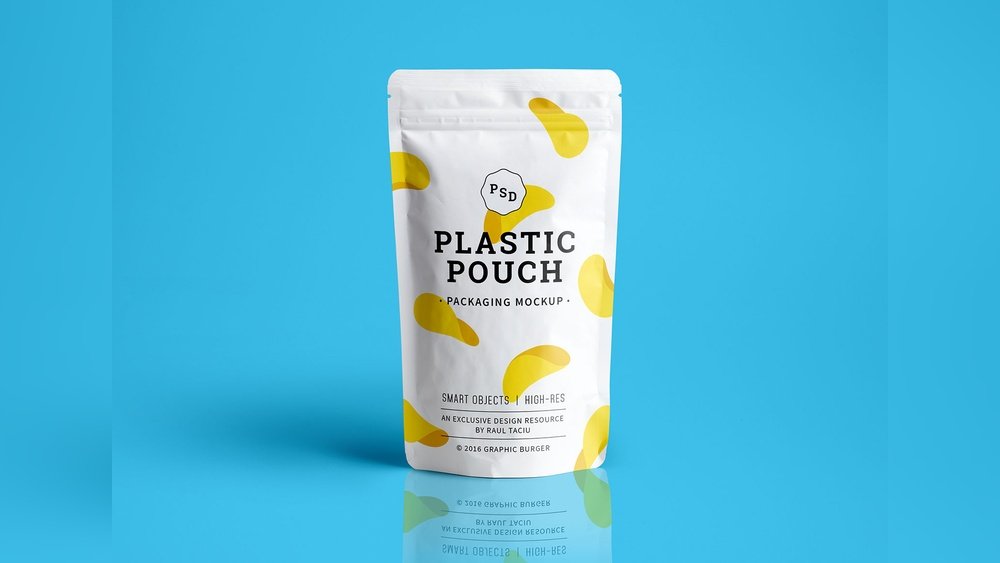
Looking to make your product packaging stand out and grab attention? A standup pouch mockup is exactly what you need.
Thank you for reading this post, don't forget to subscribe!It lets you see how your designs will look in real life before printing, saving you time and money. Imagine showcasing your brand with a sleek, professional pouch that catches every eye on the shelf. Whether you’re launching a new product or refreshing your current look, this mockup helps you visualize your ideas clearly and confidently.
Keep reading to discover how using a standup pouch mockup can transform your packaging game and boost your brand’s appeal.

Credit: www.pixeden.com
Types Of Standup Pouches
Standup pouches come in various types to fit different product needs and preferences. Understanding these types helps choose the best pouch for packaging. This section covers the main types based on material, closure, and size.
Material Variations
Standup pouches use different materials to protect and display products. Common materials include plastic, foil, and paper. Plastic offers flexibility and moisture resistance. Foil provides excellent barrier protection against light and oxygen. Paper adds an eco-friendly and natural look. Sometimes, pouches combine these materials for better performance.
Closure Options
Closure types affect how users open and reseal pouches. Zippers are popular for resealing and freshness. Spouts allow easy pouring and refilling. Tear notches make opening simple without tools. Some pouches have adhesive strips or sliders for added convenience. Closure choice depends on product type and user needs.
Size And Shape Differences
Standup pouches vary in size to fit small snacks or large bulk items. Shapes also differ, from wide-bottom to gusseted sides. Wide-bottom pouches stand firmly on shelves. Gusseted sides expand to hold more product. Slim pouches save shelf space and suit single servings. Selecting the right size and shape boosts product appeal and usability.

Credit: pixpine.com
Benefits Of Using Mockups
Using mockups offers clear benefits for designers and brands. They provide a simple way to preview ideas. Mockups help show how designs appear in real life. This lowers risks before actual production. Brands save time and money by spotting issues early. The process becomes smoother and more accurate.
Visualizing Design Concepts
Mockups turn flat designs into 3D visuals. This helps you see the final look clearly. It shows colors, shapes, and textures as they will appear. Designers can test different ideas quickly. It makes creative decisions easier and faster.
Client Presentation Advantages
Clients understand designs better with mockups. They can see how the product will look on shelves. This builds confidence in the design choice. Mockups make feedback more specific and useful. Presentations become more professional and effective.
Reducing Production Errors
Mockups reveal design flaws before printing or manufacturing. This prevents costly mistakes during production. Adjustments are made early, saving resources. The final product meets quality standards more reliably. It ensures the packaging looks perfect on delivery.
Creating Realistic Mockups
Creating realistic mockups is essential for presenting standup pouch designs effectively. A lifelike mockup helps clients and customers visualize the final product. It also adds professionalism to your portfolio or online store. The key lies in attention to detail, from software choice to lighting effects. Each step improves the overall authenticity of the mockup.
Choosing The Right Software
Select software that supports high-resolution images and layers. Adobe Photoshop is a popular choice for creating detailed mockups. Other options include Affinity Photo or GIMP for free alternatives. The software must allow easy editing and manipulation of textures and shadows. This flexibility ensures you can adjust every element for a realistic look.
Using Smart Layers And Textures
Smart layers let you insert your design without losing quality. They keep your artwork editable and scalable. Use high-quality textures to mimic the pouch material. Add wrinkles, gloss, or matte effects to match the real product. This step makes the mockup feel tangible and three-dimensional.
Lighting And Shadow Effects
Proper lighting creates depth and realism in your mockup. Use soft shadows to suggest natural light sources. Avoid harsh or flat lighting that can make the pouch look fake. Highlight areas where light hits the pouch directly. Shadows under and around the pouch add weight and placement in space.
Customizing Pouch Designs
Customizing pouch designs allows brands to create packaging that stands out on shelves. A well-designed pouch attracts customers and communicates product value. Careful design choices make the pouch both functional and visually appealing. This process involves more than just placing a logo. Every element should work together to tell the brand’s story and highlight the product.
Incorporating Brand Elements
Brand elements include logos, slogans, and unique symbols. These should be clear and prominent on the pouch. Consistent use of these elements builds brand recognition. The design must reflect the brand’s personality and values. This helps customers connect with the product emotionally. Using familiar brand elements makes the packaging trustworthy and professional.
Color And Typography Choices
Colors influence how customers feel about the product. Choose colors that match the brand and product type. Bright colors can attract attention, while muted tones suggest elegance. Typography must be easy to read and match the brand style. Use fonts that complement the overall design. Clear typography ensures product details are understood quickly.
Adding Product Information
Include essential product details on the pouch. This includes ingredients, usage instructions, and benefits. Information should be concise and easy to find. Proper placement avoids clutter and confusion. Clear product info builds customer trust and confidence. It also helps customers make quick buying decisions.
Popular Mockup Resources
Standup pouch mockups help designers and brands present packaging designs realistically. They show how products look in real life. Using quality mockup resources saves time and improves presentation. Various sources offer mockups, from free to premium options. Some tools even let users create mockups online instantly.
Free Mockup Libraries
Many websites provide free standup pouch mockups for download. These come in PSD or PNG formats. Designers can easily add their artwork using smart objects. Free libraries like Freepik and Mockey offer high-quality, photorealistic mockups. These are perfect for small projects and quick previews. They allow users to test designs without any cost.
Premium Mockup Providers
Premium providers deliver exclusive, detailed standup pouch mockups. These often include multiple angles and customizable features. Platforms like Adobe Stock and Pixeden offer paid mockup packs. These ensure higher resolution and professional quality. Brands use premium mockups to impress clients and stakeholders. The investment often results in better visual appeal and more sales.
Online Mockup Generators
Online mockup generators simplify the design process. Users upload artwork and see instant previews on standup pouches. Websites like Placeit provide easy drag-and-drop interfaces. No design software is needed to create realistic mockups. This option suits beginners and marketers needing fast results. The generated images are ready for presentations and social media.
Tips For Stunning Packaging
Creating stunning packaging for your standup pouch mockup can boost your product’s appeal. Focus on clear, attractive design to catch buyers’ eyes. Use smart techniques to make your packaging both beautiful and practical.
Focusing On Simplicity
Keep the design clean and easy to understand. Avoid clutter and too many colors. Simple packaging helps customers quickly see what the product is. Use bold fonts and clear images for better impact.
Highlighting Unique Features
Show what makes your product special on the pouch. Use icons or short text to explain benefits or ingredients. Draw attention to features like organic content or freshness. This builds trust and interest in your product.
Ensuring Print Compatibility
Check that your design fits the pouch shape perfectly. Use high-resolution images for sharp printing results. Choose colors that look good both on screen and in print. Test your design to avoid color shifts or blurry text.

Credit: www.freepik.com
How IOKPRINT Can Help You with Standup Pouch Mockup
Practical Learning with Standup Pouch Mockups
Exploring standup pouch mockups offers a valuable hands-on approach to understanding packaging design. By experimenting with different types of standup pouches and customizing pouch designs, you can gain insights into how material choices and graphics influence the final look. Creating realistic mockups helps bridge the gap between concept and physical product, allowing you to visualize benefits such as shelf appeal and consumer engagement before production.
- Start by selecting mockup resources that align with your product’s style and target audience.
- Focus on refining your design details, considering factors like color balance and logo placement.
- Review packaging tips that emphasize clarity and simplicity to enhance visual impact.
For those looking to test their designs affordably, platforms like IOKPRINT provide free delivery services and complementary sticker printing, which can be useful for prototyping labels and branding elements. Connecting with printing services that support business cards and packaging can also offer broader learning opportunities in cohesive brand presentation. These practical steps can deepen your understanding of effective packaging design in real-world contexts.
If you want to explore more options or clarify technical details, visiting www.iokprint.in might be a helpful resource to inform your next steps without any commitment.
Frequently Asked Questions
What Is A Standup Pouch Mockup?
A standup pouch mockup is a digital template showing your packaging design on a realistic pouch. It helps visualize product branding before printing. Designers use it to present packaging ideas professionally and attractively.
How Can I Use A Standup Pouch Mockup?
You can place your design into the mockup’s smart layers using software like Photoshop. This creates a photorealistic preview to share with clients or for marketing purposes. It saves time and improves design accuracy.
Where Can I Find Free Standup Pouch Mockups?
Free standup pouch mockups are available on sites like Freepik, Mockey, and Unblast. These platforms offer high-quality PSD files for commercial use. Always check licensing terms before downloading.
Why Choose A Standup Pouch Mockup For Packaging Design?
Standup pouch mockups showcase your product in a realistic way, improving client presentations. They help spot design issues early and enhance your marketing visuals. This leads to better branding and customer appeal.
Conclusion
Standup pouch mockups help present packaging designs clearly and attractively. They show how your product looks in real life. Using these mockups saves time and money on physical samples. Designers can easily adjust colors and logos on the pouch. This makes the design process faster and smoother.
Whether for food or other products, these mockups improve presentation. They are simple tools that boost visual appeal. Try using standup pouch mockups to see your ideas come alive.