Are you planning to design a visiting card but unsure about the perfect size in pixels? Getting the dimensions right is crucial to make your card look professional and sharp, whether it’s for print or digital use.
Thank you for reading this post, don't forget to subscribe!You’ll discover exactly what visiting card size in pixels works best and why it matters for your brand’s image. Keep reading to avoid common mistakes and create a card that truly stands out.
Credit: www.proglobalbusinesssolutions.com
Standard Visiting Card Dimensions
Visiting cards have a standard size that fits well in wallets and cardholders. This size helps keep your contact details clear and professional. Knowing the exact dimensions is important for design and printing.
Standard visiting card dimensions make sure your card looks good and fits common holders. These dimensions also help in creating digital designs that match print quality.
Common Sizes In Inches
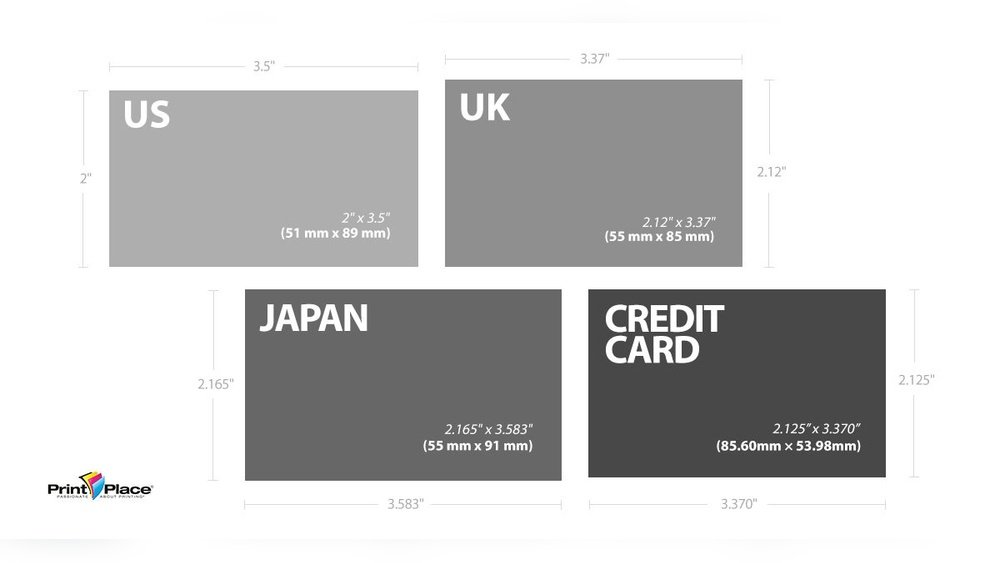
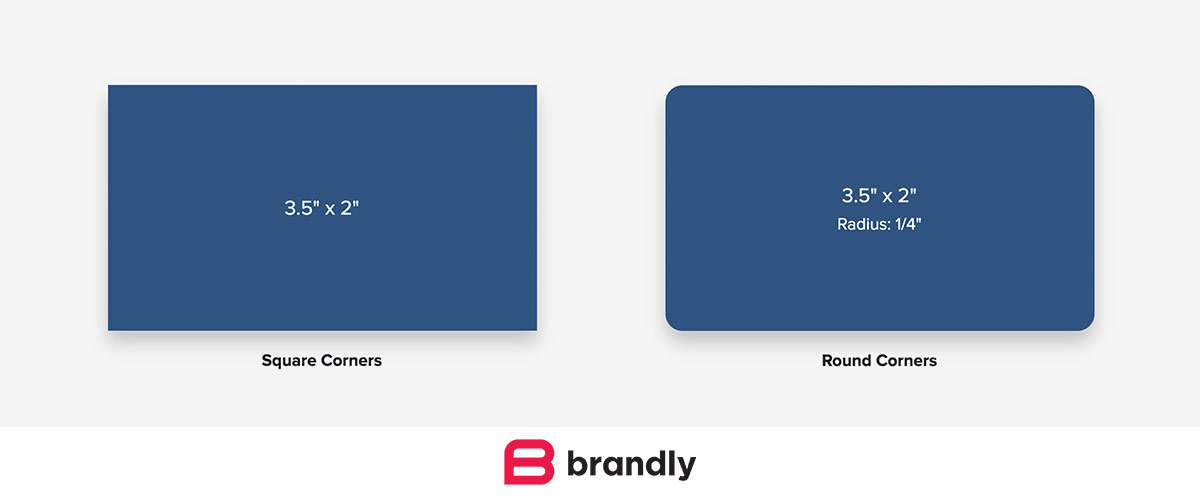
The most common visiting card size is 3.5 x 2 inches. This size works well worldwide. Some countries use slightly different sizes like 3.54 x 2.17 inches. Square cards or mini cards are less common but still used.
Sticking to standard sizes helps your card fit easily in wallets and card cases. It also avoids cutting issues during printing.
Pixel Dimensions For Digital Design
Pixel size depends on the design resolution. For print, 300 DPI (dots per inch) is standard. At 3.5 x 2 inches, this means 1050 x 600 pixels. This size keeps your card sharp when printed.
For digital-only cards, 72 DPI is common. At this resolution, the pixel size is 252 x 144 pixels. Use higher DPI for better quality prints.
Resolution And Dpi For Clarity
Resolution and DPI play a key role in the clarity of a visiting card. These two factors control how sharp and clear the images and text appear. Without the right settings, a card might look blurry or pixelated. Understanding these terms helps you create a professional-looking card that stands out.
Optimal Dpi For Printing
DPI means dots per inch. It shows how many tiny dots a printer puts in one inch. For visiting cards, 300 DPI is the best choice. This level ensures the images and text are clear and crisp. Lower DPI can make the card look fuzzy. Higher DPI is usually not needed and can increase file size.
Impact Of Resolution On Quality
Resolution is the number of pixels in an image. Higher resolution means more pixels and better detail. For a standard visiting card size, the resolution should match the printing DPI. For example, a 3.5 by 2 inch card at 300 DPI needs 1050 by 600 pixels. This balance keeps the card sharp and professional.
Designing Cards For Print
Designing cards for print requires careful attention to detail. Every element matters. The size, colors, and layout must be perfect. Print designs differ from digital ones. Colors appear different on paper. Margins and safe zones keep important parts visible. Understanding these basics helps create professional cards that stand out.
Choosing The Right Color Mode
Print designs use the CMYK color mode. It stands for Cyan, Magenta, Yellow, and Key (black). CMYK mixes these colors to print accurately. Screens use RGB, which is not suitable for printing. Using RGB can cause colors to look dull or off. Always switch your design software to CMYK before starting. This step ensures colors print as expected.
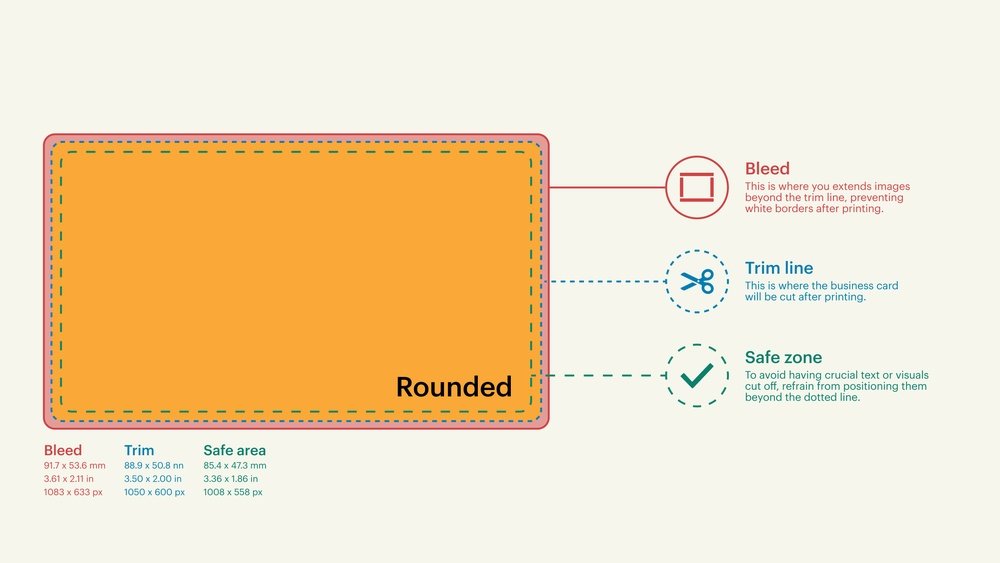
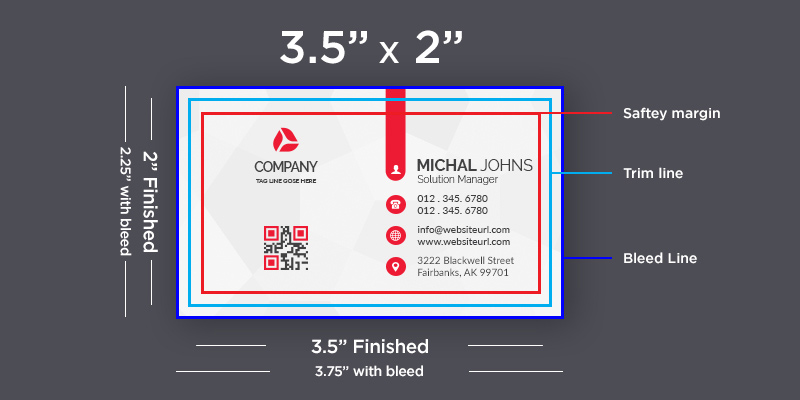
Safe Zones And Bleed Areas
Safe zones keep important text and logos inside a secure area. This prevents them from being cut off during printing. Bleed areas extend the background beyond the card edges. They avoid white borders after trimming. Typically, add 3mm bleed on all sides. Keep vital content at least 5mm inside the safe zone. These rules help produce clean, professional cards.
Converting Dimensions Between Units
Converting dimensions between different units is important when designing visiting cards. It helps create accurate digital files for printing. Pixels, inches, and millimeters are common units used in design. Understanding how to change these units keeps your design sharp and clear.
Design software often uses pixels for digital work. Printers use inches or millimeters for physical size. Knowing how to convert these units makes your work easier and precise.
Inches To Pixels Conversion
Inches are a common measurement for visiting cards. The standard size is usually 3.5 by 2 inches. To convert inches to pixels, multiply the inches by the pixels per inch (PPI) value.
For example, at 300 PPI, multiply 3.5 inches by 300 pixels to get 1050 pixels wide. Multiply 2 inches by 300 pixels to get 600 pixels tall. This gives a clear, high-quality image for printing.
Millimeters To Pixels Conversion
Millimeters are often used outside the US for card sizes. The standard size is about 89 by 51 mm. To convert millimeters to pixels, first change millimeters to inches. Divide millimeters by 25.4 to get inches.
Then multiply inches by the PPI value. For example, 89 mm divided by 25.4 equals 3.5 inches. Multiply 3.5 by 300 PPI to get 1050 pixels. This method ensures your design matches the exact physical size.
Tips For Perfect Print Results
Getting the perfect print for your visiting card depends on some important details. Small mistakes can blur text or dull colors. Follow simple tips to keep your card sharp and clear. The right steps make a big difference in the final look.
Focus on the right file type and checking your design before printing. These steps help avoid common problems and save time and money.
File Formats For Printing
Use high-quality file formats for your visiting card. PDF and TIFF files keep images sharp and clear. They hold colors and details better than JPEG or PNG. Printers prefer these formats to avoid pixelation and blur. Save your design in CMYK color mode. This mode matches printer inks for accurate colors.
Proofing Before Printing
Always check your card before printing many copies. Print a test copy on regular paper. Look for blurry text, color mistakes, or alignment issues. Ask someone else to review your card too. Fresh eyes catch errors you might miss. Fix mistakes before the final print. This step saves money and ensures quality.
Credit: www.brandly.com
.png)
Credit: www.eggradients.com
How IOKPRINT Can Help You with Visiting Card Size in Pixels
Practical Insights on Visiting Card Size in Pixels
Understanding the visiting card size in pixels is essential when moving between digital design and print. Since print dimensions are often measured in inches or millimeters, converting these to pixels requires attention to resolution and DPI for clarity—topics we explored earlier. For example, a standard 3.5 x 2 inch card at 300 DPI translates to 1050 x 600 pixels, ensuring crisp printed results.
When designing your card digitally, keeping these pixel dimensions in mind helps maintain the right proportions and sharpness. Tools and services like those available at IOKPRINT provide practical avenues to test your designs, especially if you’re looking to print in bulk with consistent quality. Their expertise in converting dimensions and optimizing designs for print can be a useful reference.
- Double-check pixel dimensions align with your desired print size and DPI.
- Use high-resolution images to avoid pixelation.
- Keep bleed areas in mind to prevent cutting off important details.
Should you need further guidance, contacting printing professionals familiar with standard business card sizes and pixel requirements can offer clarity. This practical approach bridges the gap between digital design and perfect print outcomes.
Frequently Asked Questions
What Is The Standard Visiting Card Size In Pixels?
The standard visiting card size is 1050 x 600 pixels. This size fits most printers and digital displays well.
How Many Pixels Per Inch For A Visiting Card?
Visiting cards usually use 300 pixels per inch (PPI). This resolution gives clear and sharp print quality.
Can I Use Different Pixel Sizes For Visiting Cards?
Yes, but 1050 x 600 pixels is most common. Different sizes may not print properly or look good.
Why Is Pixel Size Important For Visiting Cards?
Pixel size affects the card’s print clarity and detail. Wrong size can make the card blurry or cut off.
How To Convert Inches To Pixels For Visiting Cards?
Multiply the card size in inches by the PPI value. For example, 3. 5 inches × 300 PPI = 1050 pixels.
Conclusion
Choosing the right visiting card size in pixels matters a lot. It ensures your card looks clear and sharp. A good size helps printers produce quality cards. Small details like pixel size affect the final print. Stick to standard sizes for easy design and printing.
This way, your card will always look professional. Remember, simple and clear designs work best. Keep pixel dimensions correct, and your card will stand out. Good preparation saves time and avoids mistakes. Now, you have the key info for perfect card size.