Are you wondering if you can print business cards on a regular printer? You’re not alone.
Thank you for reading this post, don't forget to subscribe!Many people want to save time and money by doing it themselves. But is it really possible to get professional-looking cards without special equipment? You’ll discover the secrets to printing your own business cards at home. You’ll learn what works, what doesn’t, and how to avoid common mistakes that can ruin your first impression.
Keep reading to find out how you can make your business cards stand out—even with a simple printer.
Printer Types For Business Cards
Choosing the right printer matters for business cards. Different printers offer different results. Some work better for crisp text. Others handle color and paper thickness well. Understanding printer types helps you pick the best option. This way, your business cards look professional and sharp.
Here is a look at common printer types and their strengths for printing business cards.
Inkjet Vs Laser Printers
Inkjet printers spray tiny ink droplets onto paper. They create bright colors and smooth gradients. Inkjet works well with thick, textured paper. But ink takes time to dry and may smudge. Inkjet printers often cost less upfront.
Laser printers use toner powder fused by heat. They produce sharp, crisp text quickly. Laser prints resist smudging and water damage better. Laser works best on smooth, thin paper. They usually have higher print speed than inkjets.
For business cards, inkjet suits color-rich designs. Laser fits simple, text-heavy cards. Paper choice affects final quality a lot.
Advantages Of Professional Printers
Professional printers handle thicker card stock easily. They print with high resolution and consistent colors. These machines offer precise cutting and finishing options. Professional print shops use special inks that last longer. They can print on textured or coated papers.
Using professional printers means fewer print errors. Your cards come out looking polished and durable. This option suits large batches or complex designs. It saves time and ensures better presentation.
Choosing The Right Paper
Choosing the right paper is key to printing good business cards at home. The paper affects how the card looks and feels. It also impacts how well your printer handles the job. Picking paper that is too thin or smooth can ruin your cards.
Paper quality helps your cards look professional. It also makes them last longer. You want paper that is thick enough to feel sturdy. The finish of the paper changes the card’s shine and texture. Knowing these details helps you pick the best paper for your printer and design.
Cardstock Weight And Finish
Cardstock weight shows how thick the paper is. Business cards usually use paper between 80 and 110 pounds. Thicker cardstock feels stronger and looks more professional. Thin paper can bend or tear easily.
The finish is the surface texture of the paper. Matte finishes are smooth and have no shine. Glossy finishes are shiny and make colors pop. Satin finishes are between matte and glossy. Choose a finish that matches your card design and printer type.
Where To Buy Suitable Paper
Office supply stores often sell cardstock for business cards. You can find different weights and finishes there. Craft stores also carry specialty papers. They offer a wide range of styles and textures.
Online shops provide many options with detailed descriptions. You can read reviews to pick the best paper. Buying from trusted sellers helps ensure good quality. Check if the paper works well with your printer before buying large amounts.
Designing Business Cards At Home
Creating business cards at home gives you control over every detail. You can pick your style, colors, and text. This helps you make cards that fit your brand and personality. Home design saves money and lets you print cards anytime you want.
Many people worry about design skills. No need. Easy tools and templates make the process simple. Even beginners can create neat, professional cards with a little practice.
Using Templates And Software
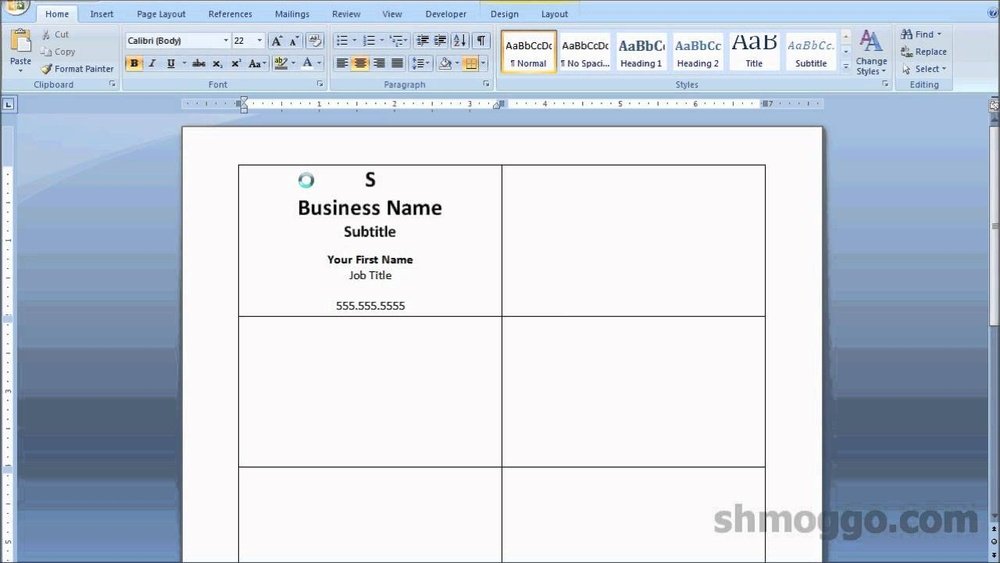
Templates provide a quick start for your design. You find many free and paid templates online. These templates have the right size and layout for business cards. They save time and avoid mistakes in setup.
Software like Microsoft Word, Canva, or Adobe Spark works well. These programs let you add text, logos, and images easily. They also offer drag-and-drop features, making design fun and simple.
Customizing Layout And Colors
Adjusting layout means moving text and images to fit your style. Keep important info clear and easy to read. Use space wisely to avoid clutter.
Colors should match your brand or personal taste. Choose two or three colors that look good together. Use contrasting colors for text and background to improve readability.

Credit: www.wikihow.com
Printing Tips For Quality Results
Printing business cards on a regular printer can save money and time. Good results depend on careful preparation. Small changes in your settings and method make a big difference. Follow these tips to get sharp, professional-looking cards.
Printer Settings To Adjust
Set your printer to the highest quality print mode. Choose “photo” or “best” for clearer images. Use the correct paper type setting, like “cardstock” or “thick paper.” This helps ink stick well and prevents smudging. Select the right paper size to match your card dimensions. Disable any “fit to page” options to keep your design sharp. Print a test sheet first to check colors and alignment.
Avoiding Common Printing Mistakes
Do not use worn or empty ink cartridges. They cause faded or streaky prints. Avoid using low-quality paper; it absorbs ink badly. Don’t print too fast, or the ink may smear. Let each side dry fully before flipping the paper. Check your design margins to prevent cutting off edges. Handle paper gently to avoid fingerprints or creases. These steps improve the look and feel of your cards.
Cutting And Finishing Techniques
Cutting and finishing are key steps in making business cards look professional. These steps shape the card and add a final touch. Proper cutting ensures clean edges. Finishing techniques protect the card and make it stand out. Both steps affect the card’s feel and durability.
Manual Vs Professional Cutting
Manual cutting uses scissors or a paper cutter. It works for small batches. It can lead to uneven edges. Precision is hard without tools made for cards.
Professional cutting uses machines like guillotines or die-cutters. These tools cut cards evenly and fast. They produce sharp, clean edges. They handle bulk orders well. If quality matters, professional cutting is best.
Adding Coatings And Embellishments
Coatings protect cards from dirt and water. Common types include matte, gloss, and satin. Coatings also make cards feel smooth or shiny.
Embellishments add style and texture. Examples are foil stamping, embossing, and spot UV. These features catch the eye and add depth. Simple cards can look more elegant with them.

Credit: www.wikihow.com
Cost Comparison: Home Vs Professional Printing
Printing business cards at home or using a professional service affects your budget differently. Costs depend on materials, ink, time, and effort. Knowing these differences helps choose the best option for your needs.
Material And Ink Expenses
Home printing needs special card stock. This paper costs more than regular sheets. Ink cartridges also use a lot of ink for sharp, colorful prints. Ink replacement can be expensive fast. Professional printers buy supplies in bulk. This lowers the cost per card. They use machines designed for thick paper and vibrant colors.
Time And Effort Considerations
Printing at home takes time to set up. You must align the cards and check print quality. Mistakes waste paper and ink. Designing cards also requires effort if you want a good look. Professional services handle all printing steps. They deliver ready-to-use cards quickly. This saves your time and reduces stress.
When To Choose Professional Services
Choosing professional services for printing business cards makes sense in certain cases. These services offer quality and features that regular printers cannot match. Knowing when to use them saves time and effort.
High Volume Needs
Printing many business cards at home takes a lot of time. Regular printers may run out of ink or paper quickly. Professional services handle large orders fast and without errors. They also keep the print quality consistent across all cards. Great for events or conferences where many cards are needed.
Advanced Design Features
Professional printers offer special finishes like embossing or foil stamping. These effects make business cards look unique and stand out. Regular printers cannot produce these high-end details. Professionals also print on thick or textured paper that home printers cannot handle. Ideal for creating a strong and lasting impression.

Credit: www.youtube.com
Frequently Asked Questions
Can You Use Regular Paper For Business Cards?
Regular paper is not ideal for business cards. It lacks durability and professional appearance. Use thick cardstock for better quality and a polished look.
What Printer Settings Work Best For Business Cards?
Set your printer to high-quality or photo mode. Choose the correct paper type, usually cardstock. This ensures sharp text and vibrant colors for your cards.
Are Inkjet Or Laser Printers Better For Business Cards?
Laser printers offer sharper text and smudge resistance, ideal for business cards. Inkjet printers produce vibrant colors but may smudge on certain papers.
Can I Design Business Cards At Home Easily?
Yes, you can design business cards at home using free or paid software. Templates simplify layout and ensure correct size and spacing.
Conclusion
Printing business cards on a regular printer is possible but has limits. Quality may not match professional printing services. Use good paper and adjust printer settings for better results. Simple designs work best for home printing. Small batches are easy to handle yourself.
For larger needs, consider a print shop. This way, you get clear, sharp cards every time. Choose the method that fits your budget and purpose. Your business cards should represent you well. Keep it simple and clear for the best impact.